Yes, most pet care businesses should adopt AI for scheduling — provided you have at least two to six weeks of booking history, a team of three or more staff, and reasonably consistent appointment patterns. When those conditions are met, the payoff is real: scheduling time can drop from roughly four hours per week to about two minutes, and labor costs can improve meaningfully once the system learns your demand patterns. The best next step is to export a sample week of bookings and staff availability, then run a pilot. Thedoggurus’ owner products include coaching and onboarding templates designed to guide you through exactly that process.
Table of Contents
- How does AI scheduling actually work for pet care operations?
- Why AI scheduling matters specifically for pet care businesses
- What features should you look for in an AI scheduler for pet care?
- How do you implement AI scheduling step by step?
- What does AI scheduling cost, and what ROI can you expect?
- What U.S. legal and HR issues apply to automated scheduling?
- Which KPIs should you track after deploying an AI scheduler?
- What pitfalls should pet care operators watch for?
- How Thedoggurus supports AI scheduling adoption
- Key Takeaways
- The case for keeping humans in the scheduling loop
- Ready to put AI scheduling to work in your pet care business?
- Useful sources
How does AI scheduling actually work for pet care operations?
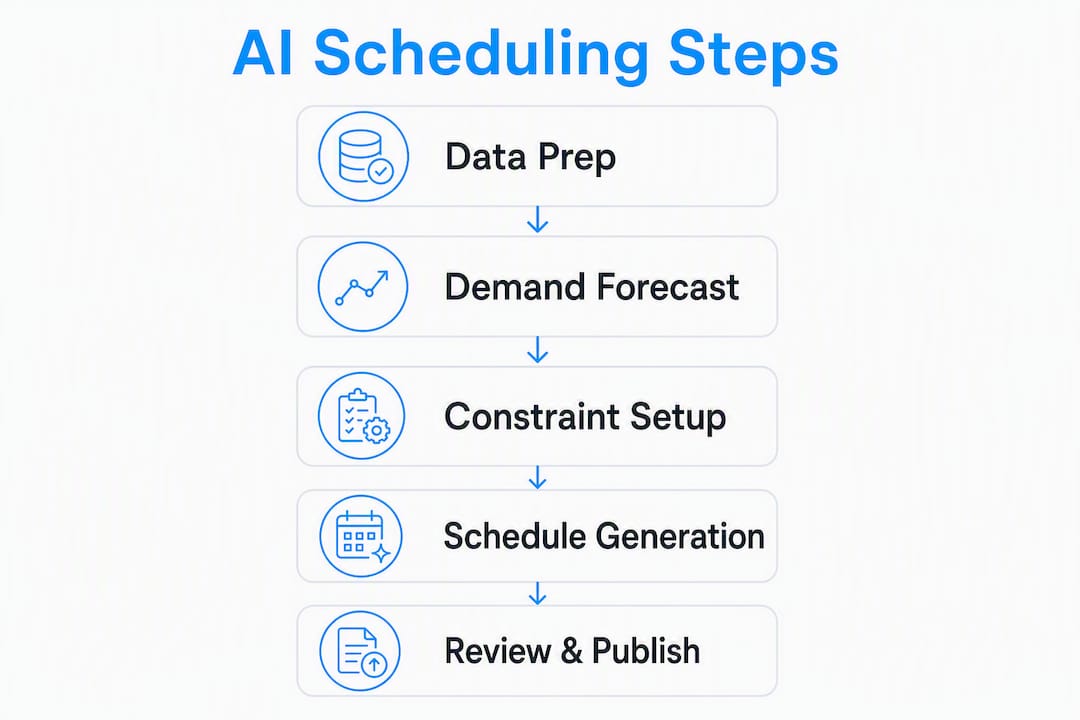
AI turns your historical bookings, staff availability, and business rules into optimized shift plans automatically. The engine pulls from several data inputs simultaneously:
- Historical bookings (timestamps, service types, durations)
- Employee availability and preferences
- Service-specific rules (max dogs per playgroup, groom slot length, transit buffers between pickups)
- Labor rules (overtime thresholds, required breaks, pay rates)
- On-site capacity (kennels, grooming stations, play yards)
Under the hood, most platforms use Integer Linear Programming (ILP) or similar constraint solvers. These engines evaluate millions of possible shift combinations and return the one schedule that satisfies every rule while minimizing cost. Separately, a demand-forecasting layer uses historical data, weather, and local events to predict how many staff you need on any given day before you even open the booking calendar. The system also learns continuously from manager edits and real attendance, so accuracy improves with every scheduling cycle.
Pro Tip: Gather two to six weeks of booking exports, your current payroll rules, and a simple staff availability sheet before you contact any vendor. Clean inputs produce a far better pilot result than raw, unformatted data.
Why AI scheduling matters specifically for pet care businesses
Predictable coverage, less last-minute scrambling, and tighter labor cost control are the three outcomes pet care operators feel first. A grooming salon that books six to ten appointments per stylist per day cannot afford a no-show without a plan. An AI scheduler spots that gap the night before and sends an automated shift offer to an available team member, rather than leaving a manager to make frantic calls at 7 AM.

Picture a busy Saturday at a dog daycare. Drop-offs peak between 7 and 9 AM, pickups cluster from 4 to 6 PM, and midday is lighter. A manual schedule often overstaffs midday and understaffs the morning rush. An AI system reads that pattern from your booking history and builds a shift structure that matches labor to actual demand, cutting idle hours without sacrificing safety ratios.
Measurable benefits owners report include:
- Fewer double-bookings and last-minute walk cancellations
- Better utilization of groomers and trainers across the day
- Reduced overtime from smarter shift sequencing
- Stronger staff work-life balance through preference-aware scheduling
What features should you look for in an AI scheduler for pet care?
Not every scheduling platform handles the quirks of pet care. Look for these core capabilities when you evaluate options:
- Automated shift generation that respects your dog-to-staff ratios
- Demand forecasting tied to your booking calendar
- Rules engine covering overtime, mandatory breaks, and state-specific wage-hour requirements
- Employee preference handling and shift-swap self-service
- Multi-location support if you run more than one facility
- Real-time reoptimization so the system can rebuild a compliant schedule in minutes when someone calls out
Domain-specific features matter too. Pet care schedulers need to handle transit buffers between dog-walking pickups, group-walk capacity limits, and appointment-length variability for grooming versus training sessions. Understanding how booking systems integrate with scheduling is worth reviewing before you commit to any platform.
Integration requirements to confirm before signing:
- Booking and CRM platform (two-way sync)
- Payroll and timeclock system
- Payment processor or POS
- SMS or messaging for client reminders and staff alerts
Pro Tip: Prioritize vendors that offer open APIs or native integrations for your existing booking tool and payroll provider. Manual data entry between systems erases much of the time savings the AI delivers.
How do you implement AI scheduling step by step?
A phased rollout reduces risk and builds staff confidence. Here is a realistic timeline:
- Week 0 — Readiness check: Audit your booking data quality, document payroll rules, and define your operational constraints (max dogs per group, groom durations, required staff certifications).
- Weeks 1–2 — Pilot setup: Export historical bookings, import staff availability and preferences, configure your rules engine, and run the first AI-generated schedule side by side with your manual one.
- Weeks 3–8 — Pilot run: Let the AI schedule run live for four to six weeks. Managers review and override as needed, logging every change.
- Weeks 9–10 — Review and tweak: Compare labor cost percentage, coverage gaps, and override frequency against your baseline. Adjust rules where the AI consistently missed.
- Weeks 11–18 — Phased rollout: Expand to all shifts or additional locations, using the pilot learnings to configure the full system.
| Data field | Why it matters | Sample format |
|---|---|---|
| Booking timestamps | Drives demand forecasting | Date, time, service type |
| Service durations | Sets shift length and buffers | Minutes per service category |
| Staff availability | Prevents conflicts | Weekly grid or iCal export |
| Pay rules | Ensures overtime compliance | Rate, OT threshold, break rules |
Change management is as important as the technology. Walk your team through the new system before go-live, explain how preferences are captured, and keep an easy override workflow so managers never feel locked out. Thedoggurus’ staff onboarding resources cover how to introduce new operational tools without disrupting your team culture.
What does AI scheduling cost, and what ROI can you expect?
Most platforms price by location (a flat monthly fee per facility), by employee per month, or through tiered feature plans. Trial or demo availability is a meaningful selection signal — vendors confident in their product offer both.
A simple ROI formula: (weekly labor savings × 52 − annual subscription cost) ÷ annual subscription cost = ROI. For a small pet care business, conservative assumptions work best. Vendor claims for complex industrial environments cite substantial labor-cost reductions; for a small service business, expect moderate labor improvement and meaningful time savings.
| Impact metric | Conservative range | Source basis |
|---|---|---|
| Scheduling time saved | from about four hours per week to roughly two minutes | Vendor-reported |
| Labor cost improvement | moderate improvement for small teams | Conservative vs. industrial claims |
| Schedule accuracy | Up to 96% staff-match rate with preference data | Practitioner data |
For budget modeling and wage forecasting, Thedoggurus has dedicated resources that pair well with these ROI calculations.
What U.S. legal and HR issues apply to automated scheduling?
Automating schedules does not exempt you from employment law. Key issues to review:
- Federal overtime rules under the Fair Labor Standards Act (FLSA): non-exempt employees must receive 1.5× pay beyond 40 hours per week
- State-specific break requirements (California, for example, mandates a 30-minute meal break after five hours)
- Predictive scheduling ordinances in cities including San Francisco, Chicago, New York, Seattle, and Philadelphia, which require advance notice of schedules and premium pay for last-minute changes
- Accommodation requests for religious observance, disability, or family obligations that the AI must flag rather than override silently
- Manager override documentation so every AI-generated decision that is changed has a logged reason
Review your state’s wage-hour rules through the U.S. Department of Labor and check your city’s municipal code for predictive-scheduling requirements. Constraint modeling in enterprise-grade platforms can encode many of these rules, but a qualified HR professional or employment attorney should validate your configuration before go-live.
Which KPIs should you track after deploying an AI scheduler?
Monitor these metrics weekly for the first three months:
- Labor cost percentage (labor spend ÷ revenue): your primary profitability signal
- Schedule fill rate: percentage of required shifts covered without manual intervention
- Average schedule creation time: baseline versus post-AI
- Shift-change frequency: how often the AI schedule is modified after publication
- No-shows and cancellations: both staff and client
- Staff satisfaction and turnover rate: a lagging indicator of schedule fairness
Profitability KPIs (labor %, fill rate) tell you whether the tool is paying for itself. Experience KPIs (shift-change frequency, staff satisfaction) tell you whether your team trusts it. Both matter. A weekly dashboard with overtime alerts, coverage-gap flags, and a manager override log gives you everything you need to course-correct quickly. Staff accountability practices documented in your operations manual integrate naturally with this reporting cadence.
What pitfalls should pet care operators watch for?
Poor forecast accuracy is the most common early failure. Fix it by adding local events, school calendars, and seasonal patterns to your training data. A grooming salon near a dog show circuit will see demand spikes the AI cannot predict without that context.
Staff pushback usually stems from a loss of perceived control. A phased rollout with visible preference-capture and a clear self-service shift-swap feature addresses most of it. Finding time to train your team on the new system before go-live is worth the investment.
Over-automation is a real risk. Keep a human in the loop: managers should review every AI-generated schedule before publication, log overrides with a brief reason, and run a manual contingency roster for peak days like holiday weekends. Validate forecast accuracy against real bookings weekly for the first two months.
How Thedoggurus supports AI scheduling adoption
Thedoggurus brings together the coaching, templates, and operational tools pet care operators need to move from manual scheduling to an AI-assisted model confidently. Here is what the platform provides:
- Owner coaching from industry-experienced operators who have built and run pet care businesses
- Onboarding templates and staffing playbooks that define the rules your AI scheduler needs to function correctly
- Staff training modules covering how to use self-service scheduling features and how to submit preferences
- Manager playbooks for reviewing AI output, logging overrides, and running a feedback loop
- KPI dashboards calibrated to pet care metrics: labor percentage, coverage, groomer utilization, and client on-time arrivals
Oliver and the Thedoggurus team designed this implementation playbook from direct operational experience, not theory. The platform’s AI-powered learning tools act as a 24/7 accountability partner, so you spend less time on administrative tasks and more time leading your team and growing your business.
Key Takeaways
AI scheduling delivers the most value for pet care businesses that have clean booking data, defined labor rules, and a willingness to run a structured pilot before full rollout.
| Point | Details |
|---|---|
| Start with clean data | Export two to six weeks of bookings and payroll rules before contacting any vendor. |
| Expect realistic gains | Scheduling time can drop from roughly four hours per week to about two minutes for small teams, and labor improvement should target 5–15%, not the 30–50% cited for industrial cases. |
| Compliance is your responsibility | Configure your rules engine for FLSA overtime and any local predictive-scheduling ordinances before go-live. |
| Track both profit and people KPIs | Labor cost percentage measures ROI; shift-change frequency and staff satisfaction measure trust. |
| Thedoggurus accelerates adoption | Owner coaching, staffing playbooks, and KPI dashboards from Thedoggurus reduce pilot risk and speed up results. |
The case for keeping humans in the scheduling loop
The conversation around AI scheduling tends to split into two camps: operators who expect the software to run everything, and operators who dismiss it as too complex for a small pet care business. Both positions miss the point.
The real value of intelligent scheduling solutions is not full automation. It is the elimination of low-value administrative work so you can focus on the decisions that actually require judgment: handling a difficult client situation, coaching a new team member, or deciding whether to add a second grooming station. The AI handles the combinatorial math. You handle the leadership.
What I have seen consistently is that the businesses that get the most from these tools are the ones that treat the first pilot as a learning exercise, not a deployment. They validate the AI’s output against reality, log every override, and feed that information back into the system. That feedback loop is what turns a generic scheduling engine into something that actually understands your business. Thedoggurus’ coaching model is built around exactly that iterative approach, because the playbook matters as much as the platform.
Ready to put AI scheduling to work in your pet care business?
Thedoggurus gives pet care operators something most scheduling guides leave out: a coach who has actually run a dog daycare, a boarding facility, or a grooming salon and knows what a Saturday morning looks like when three staff call out. The owner products include pilot support, onboarding templates, staff training modules, and KPI dashboards built specifically for pet care operations — not adapted from a generic workforce management tool.
Your next step is straightforward. Visit the Thedoggurus owner products page, choose the plan that fits your team size, and book a coaching session to map your pilot. You will leave with a data export checklist, a rules configuration template, and a clear timeline to your first AI-generated schedule.
Useful sources
- U.S. Department of Labor — Wage and Hour Division: Federal overtime, break, and FLSA compliance guidance
- Harri AI-powered Scheduling: Vendor documentation on scheduling time reduction and continuous learning
- APOLLO Scheduler: ILP optimization engine explanation and real-time reoptimization claims
- Legion Schedule Optimization: Demand forecasting methodology and staff-match rate practitioner data
- OptiSchedule AI: Labor-cost reduction benchmarks and constraint-modeling documentation
- Bizzly Pet Care Scheduling Software: Domain-specific pet care scheduling features (transit buffers, group capacity, payment integration)
- Online grooming booking systems: Overview of grooming-specific booking and scheduling integration